
Document Management
Your documents, answered by AI
Upload, organize, and instantly search your community's documents with AI. Bylaws, CC&Rs, meeting minutes, financial reports — all accessible with visibility controls for who can see what.
Why HOA Document Management Matters
Community associations generate and accumulate a significant volume of documents over their lifetime — governing documents, amendments, meeting minutes, financial statements, vendor contracts, insurance certificates, and correspondence. When these documents live in filing cabinets, personal email inboxes, or scattered across multiple cloud drives, finding the right document at the right time becomes a recurring problem. Board members cannot locate the amendment that changed the pet policy. Managers cannot find last year's landscaping contract to compare bids. Residents ask questions about rules that are clearly documented but practically inaccessible. PropMIS provides a centralized document library purpose-built for community associations, where every document is uploaded once, organized by category, and searchable by AI.
- Eliminates scattered documents across email, drives, and filing cabinets
- Centralized library accessible to authorized managers, board members, and residents
- Reduces time spent searching for governing documents and past records
- Provides a single source of truth for community policies and financial history
AI-Powered Document Search
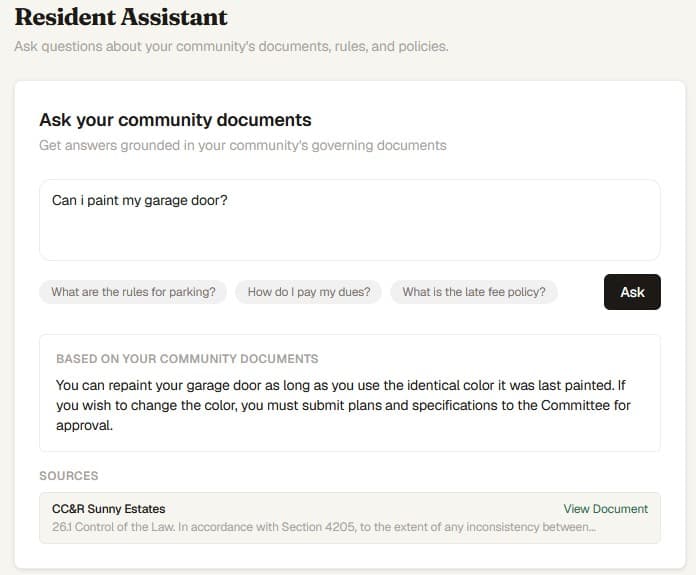
Traditional document management systems let you search by file name or folder — which only works if someone named and organized the file correctly in the first place. PropMIS goes further with an AI-powered search that indexes the actual content of uploaded documents. When a resident asks 'Can I install a satellite dish?' the AI searches across all uploaded governing documents and returns the relevant section from the CC&Rs or architectural guidelines, along with a citation to the specific document and page. This same capability powers the resident-facing document Q&A feature, where homeowners can get instant answers without contacting the manager or board. The indexing pipeline processes documents automatically upon upload, so new documents become searchable without any manual tagging or configuration.
- Full-content AI indexing — not just file name search
- Natural language queries return relevant sections with citations
- Powers the resident-facing AI Q&A feature in the resident portal
- Automatic indexing on upload — no manual tagging required
- Search across all documents simultaneously for cross-reference answers
Visibility Controls
Not every document should be visible to every person in the community. Financial audit reports may be board-only. Governing documents should be accessible to all residents. Marketing materials or welcome packets might be public. PropMIS provides three visibility levels for every document: public (visible to anyone, including non-authenticated visitors), resident (visible to authenticated community members), and board-only (visible only to board members and managers). These controls are set per document at upload time and can be changed at any time. This means your board can maintain confidential documents — legal correspondence, delinquency reports, executive session minutes — alongside resident-facing documents, all in the same system with appropriate access boundaries.
- Three visibility levels: public, resident, and board-only
- Controls set per document and adjustable at any time
- Board-only documents remain invisible to residents in the portal
- Public documents accessible without authentication for prospective buyers
- All visibility changes recorded in the audit trail
Document Organization
PropMIS organizes documents by category to keep the library manageable as it grows. Common categories include governing documents (bylaws, CC&Rs, amendments), financial records (budgets, audits, tax returns), meeting records (agendas, minutes, resolutions), vendor documents (contracts, insurance certificates, compliance records), and community resources (welcome packets, architectural guidelines, community maps). Documents can be uploaded individually or in bulk, and each upload captures metadata including the document title, category, description, and visibility level. The organized structure means that both managers and residents can browse documents by category rather than scrolling through a single undifferentiated list.
- Category-based organization for governing documents, financials, meetings, and more
- Individual and bulk upload with metadata capture
- Browseable by category for quick access without searching
- Document descriptions provide context without opening the file
- Scales cleanly from a handful of documents to hundreds over time
Meeting Minutes and Board Records
Meeting minutes are among the most frequently requested and most commonly misplaced community association documents. PropMIS makes meeting minutes a first-class document type. Minutes from board meetings, annual meetings, and committee meetings can be uploaded, categorized, and made available to the appropriate audience — typically all residents for regular board meetings and board-only for executive sessions. When combined with the AI search capability, residents and board members can search across years of meeting minutes to find when a specific topic was discussed or a particular decision was made. This historical searchability is valuable during board transitions, dispute resolution, and long-term planning. PropMIS is available at $99/mo per community plus $3/unit over 10, with a 45-day free trial and no credit card required.
- Meeting minutes treated as a first-class document type
- Separate visibility for regular meeting minutes and executive session records
- AI search across years of minutes for specific topics and decisions
- Valuable for board transitions and institutional knowledge preservation
- Supports annual meeting, board meeting, and committee meeting records
Frequently Asked Questions
Common questions
What file types can be uploaded?
PropMIS supports common document formats including PDF, Word documents, and image files. Documents are indexed by the AI pipeline upon upload for full-content search.
Can residents search documents from the resident portal?
Yes. Residents can browse documents by category and use the AI-powered Q&A feature to ask questions that are answered from the community's uploaded documents. They only see documents with resident or public visibility.
Is there a storage limit?
PropMIS includes generous document storage in the standard subscription. Early-access communities have not encountered storage limitations during normal community association use.
How much does PropMIS cost?
$99/mo per community plus $3 per unit over 10. Every feature — including document management and AI search — is included. The 45-day free trial requires no credit card.
Ready to modernize your community?
$99/mo per community. 45-day free trial. No credit card required.