
Vendor Management
HOA Vendor Management Software with Bidding, Work Orders, and Compliance
Post RFPs, collect competitive bids, manage work orders, track compliance documents, and handle invoices — all in one vendor management system built for HOAs.
What HOA Vendor Management Software Does
Vendor management is one of the most time-consuming responsibilities for HOA managers and board members. Between soliciting bids, tracking insurance certificates, managing work orders, and reconciling invoices, the average community spends hours each week on vendor coordination alone. Most of that work happens across email threads, spreadsheets, and paper files — creating gaps that lead to missed renewals, unclear contract terms, and difficulty comparing costs year over year. HOA vendor management software centralizes every vendor interaction into a single system. From the initial RFP through contract completion, every document, communication, and financial transaction is tracked and accessible. PropMIS includes vendor management as part of the core platform — not as an add-on module — so every community gets access to professional-grade vendor tools at $99/mo plus $3/unit over 10 units.
- Centralized vendor profiles with contact information, service categories, and performance history
- Digital RFP posting with structured bid collection and side-by-side comparison
- Work order lifecycle management from creation through board approval to completion
- Compliance document tracking with expiration alerts for insurance and licensing
- Invoice submission and approval workflows tied to specific contracts and work orders
Competitive Bidding and RFPs
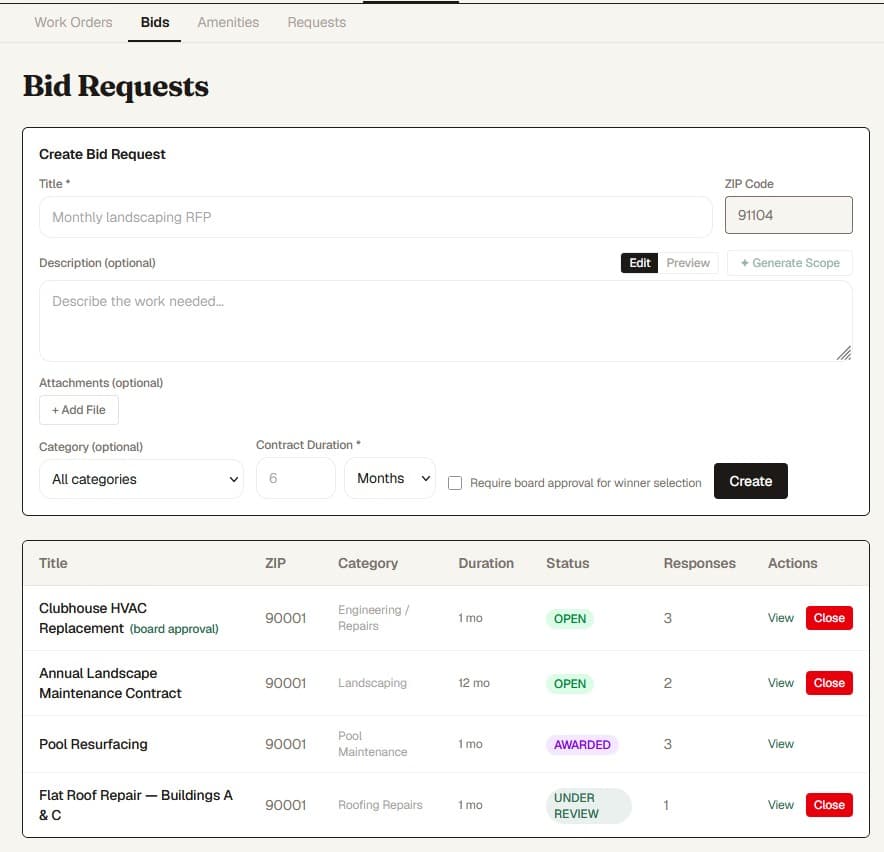
Getting fair pricing for community services requires a structured bidding process, but many HOAs skip competitive bidding because the logistics are overwhelming. Drafting RFPs, distributing them to qualified vendors, collecting responses, and comparing bids in an apples-to-apples format takes significant effort when done manually. PropMIS makes competitive bidding practical for communities of any size. Managers create RFPs with detailed scope descriptions, invite vendors from the platform marketplace or add new vendors directly, and collect structured bids that can be compared side by side. The board reviews bids through the governance dashboard and can approve awards without scheduling a separate meeting. Early-access communities report that structured bidding through the platform surfaces cost differences they would have missed when relying on a single vendor quote.
- Create RFPs with scope of work, timeline, and budget range
- Invite specific vendors or open RFPs to the PropMIS vendor marketplace
- Receive structured bids that display in a consistent, comparable format
- Board members review and vote on bid awards through the governance portal
- Award contracts and automatically generate work orders from accepted bids
Work Order Management
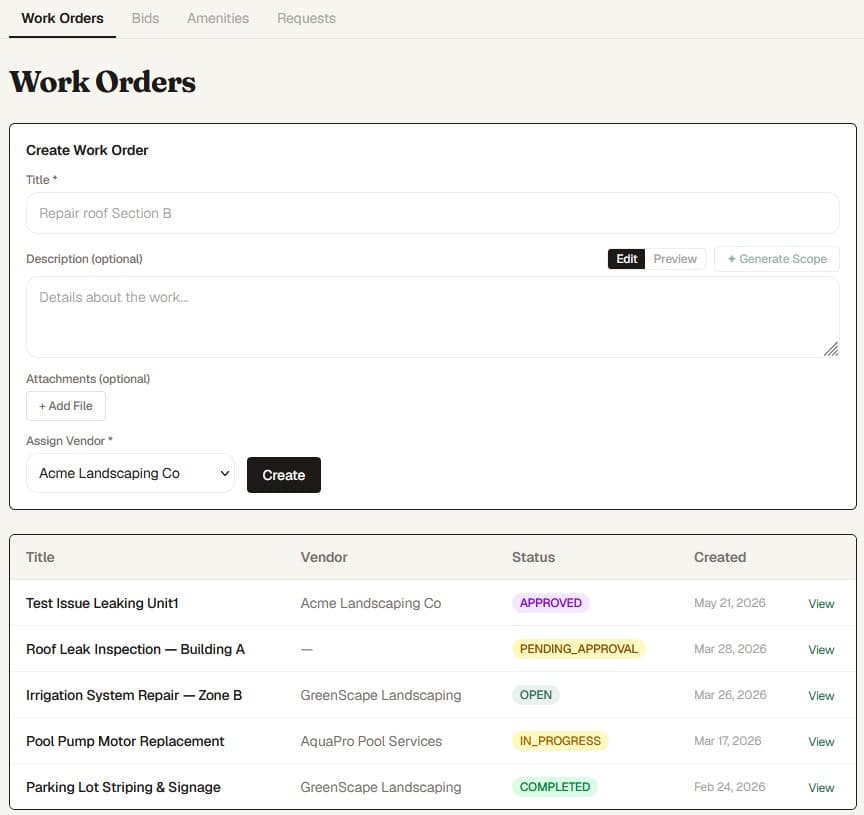
Work orders are the backbone of vendor accountability. Without a clear system, it is difficult to know whether a landscaper completed their weekly visit, whether a plumber actually fixed the reported leak, or whether a painting contractor stayed within the approved scope. PropMIS tracks every work order from creation to completion. Managers create work orders manually or generate them from approved bids. Each work order includes scope, timeline, assigned vendor, and budget. Board approval workflows ensure that expenditures above community thresholds get proper review before work begins. Vendors can update work order status, attach completion photos, and submit invoices directly through their vendor portal — reducing the back-and-forth that typically happens over email and phone.
- Create work orders with detailed scope, timeline, and budget
- Configurable board approval thresholds for expenditure oversight
- Vendor portal access for status updates and completion documentation
- Full work order history searchable by vendor, date, category, or status
Compliance Document Tracking
Every vendor working on community property should carry appropriate insurance and licensing. Tracking these documents — and their expiration dates — is a critical but easily neglected responsibility. A lapsed insurance certificate discovered after an incident creates significant liability exposure for the association. PropMIS stores compliance documents against each vendor profile and monitors expiration dates automatically. When a certificate of insurance, business license, or workers compensation policy approaches expiration, the system alerts managers so they can request updated documentation before work continues. This is not a guarantee against all compliance issues, but it replaces the manual calendar reminders and filing cabinets that most communities rely on today.
- Store certificates of insurance, business licenses, and workers comp documentation per vendor
- Automatic expiration tracking with advance alerts to community managers
- Vendors can upload renewed documents directly through their portal
- Document history maintained for audit trail and board review
Contract and Invoice Management
Vendor contracts often live in email attachments or filing cabinets, making it difficult to reference terms, renewal dates, or pricing when questions arise. Similarly, invoices arrive through multiple channels and get reconciled manually against budgets and work orders. PropMIS ties contracts and invoices directly to vendor profiles and work orders. When an invoice arrives, managers can match it to the corresponding work order and contract, verify that amounts align with agreed pricing, and approve payment through a structured workflow. Recurring contracts — such as monthly landscaping or quarterly pest control — can be templated so that work orders and expected invoices generate automatically. The platform provides a clear financial picture for each vendor relationship, making budget reviews and annual vendor assessments straightforward. All vendor management features are included in the PropMIS platform at $99/mo plus $3/unit over 10 units, with a 45-day free trial and no credit card required to start.
- Store contracts with terms, renewal dates, and pricing against vendor profiles
- Match invoices to work orders and contracts for accurate reconciliation
- Recurring contract templates for ongoing vendor relationships
- Financial reporting by vendor for budget reviews and annual assessments
- 45-day free trial with full vendor management access, no credit card required
Frequently Asked Questions
Common questions
Is vendor management included in the base price?
Yes. Vendor management — including RFPs, bidding, work orders, compliance tracking, and invoices — is included in every PropMIS subscription at $99/mo plus $3/unit over 10 units. There are no add-on modules or feature tiers.
Can vendors access the system directly?
Yes. Vendors receive portal access where they can view assigned work orders, update status, upload completion documentation, submit invoices, and manage their compliance documents. Vendor access is included at no additional cost.
How does the competitive bidding process work?
Managers create RFPs with scope and requirements, invite vendors to bid, and collect structured responses. Bids display in a side-by-side comparison format. Board members review and approve awards through the governance dashboard.
Does PropMIS track vendor insurance and licensing?
PropMIS stores compliance documents per vendor and tracks expiration dates with advance alerts. This helps managers stay on top of renewals, but communities should still consult their legal counsel regarding specific insurance requirements.
Ready to modernize your community?
$99/mo per community. 45-day free trial. No credit card required.