
Financial Ledger
One Ledger Per Unit. Every Dollar Accounted For.
Stripe payments, AutoPay charges, manual checks, late fees, and reversals — all recorded in a single rolling ledger per unit. No reconciliation spreadsheets. No missing transactions. One source of truth for your community's finances.
The Per-Unit Ledger: Your Single Source of Financial Truth
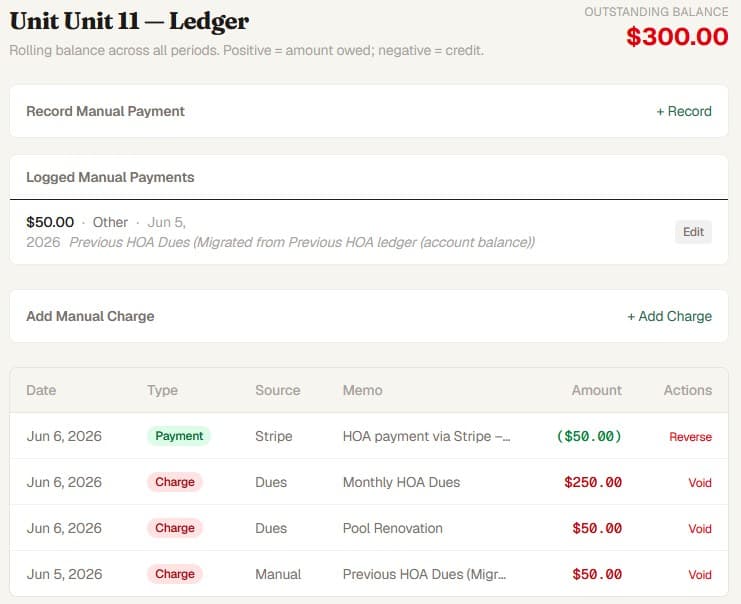
Every unit gets its own rolling ledger that records charges (dues, late fees, special assessments) and payments (Stripe, AutoPay, manual check, wire, cash) in chronological order. The balance is computed from the sum of all signed entries — positive for charges, negative for payments. Nothing is ever deleted. Corrections are handled through compensating entries (reversals), preserving a complete, tamper-resistant financial history. When a resident disputes a charge or a board member asks about a unit's balance, the ledger provides an authoritative, timestamped answer.
- Rolling ledger per unit with chronological transaction history
- Balance computed from signed entries — never stored, never stale
- Charges, payments, late fees, and reversals in one timeline
- Nothing deleted — corrections via compensating reversal entries
- Complete audit trail: who posted, when, and why
Stripe Payments — Recorded Instantly, Reconciled Automatically
When a resident pays through the portal, Stripe processes the payment and PropMIS records it in the unit's ledger automatically via webhook reconciliation. No manual entry, no end-of-day batch imports. The ledger shows the payment amount, source (Stripe), payment intent ID, and timestamp. Your community connects its own Stripe account through Stripe Connect — dues flow directly to your association's bank account. PropMIS does not hold funds or mark up processing fees. Concurrency guards and idempotency checks prevent duplicate postings even if webhooks fire more than once.
- Webhook-based reconciliation — payments post to the ledger in real time
- Stripe Connect — your community controls its own Stripe account
- No fund holding, no fee markups — standard Stripe rates apply
- Idempotent processing prevents duplicate ledger entries
- Payment source, amount, and intent ID recorded for every transaction
AutoPay: Set It, Forget It, Audit It
Residents enroll in AutoPay from their portal. Each billing cycle, PropMIS charges their stored payment method automatically using Stripe's off-session payment infrastructure. Successful charges post to the ledger as PAYMENT entries with source STRIPE. Failed charges trigger up to three retry attempts at three-day intervals before the enrollment is flagged for resident action. Every AutoPay event — enrollment, charge, failure, retry, unenrollment — is recorded. The board sees the same ledger entries regardless of whether a payment was manual, one-time Stripe, or AutoPay.
- Resident-initiated enrollment — boards cannot enroll without consent
- Off-session charging with stored payment method
- Up to 3 automatic retries on failed payments before requiring action
- All AutoPay payments appear in the same per-unit ledger
- Enrollment status visible to both residents and managers
Manual Payments: Checks, Wire, and Cash — In the Same Ledger
Not every resident pays online. PropMIS lets managers record manual payments — check, wire transfer, money order, or cash — directly into the unit's ledger. Manual entries carry the same weight as Stripe payments: they reduce the unit's balance, appear in the same chronological timeline, and are included in all financial reports. Check payments store the check number. Wire transfers record bank details. Every manual entry logs who recorded it, when, and the payment date (which can differ from the recording date). Duplicate guards prevent the same amount from being posted twice within 60 seconds, and the same check number from being recorded twice.
- Record check, wire, money order, and cash payments
- Same ledger as Stripe and AutoPay — one financial timeline
- Check number and payment method tracked per entry
- Recorder identity and timestamp in the audit trail
- Duplicate guards prevent accidental double-posting
Reversals and Voids — Corrections Without Deletion
Financial records should never be erased. When a charge needs to be voided or a payment reversed, PropMIS creates a compensating entry — a new ledger entry that offsets the original. The original entry remains in the ledger, marked with a reversal timestamp and linked to its compensating entry. For self-managed communities, reversals require board approval through PropMIS's voting workflow: a manager requests the reversal, board members vote, and the system executes only when the required majority approves. For managed communities, managers execute reversals directly. Both paths produce a complete audit trail showing who requested the reversal, why, who approved it, and when it was executed.
- Compensating entries preserve the full transaction history
- Original entries never deleted — marked and linked to reversals
- Self-managed communities require board majority vote for reversals
- Reversal reason documented in the audit trail
- Void for charges, Reverse for payments — distinct workflows for clarity
Billing Statements and Financial Visibility
PropMIS generates billing statements from your ledger data — PDF documents showing each unit's charges, payments, and balance for a given period. Statements can be emailed automatically when dues are generated or downloaded in bulk by managers. For boards, the ledger provides the data behind every financial conversation: who owes what, how much was collected this month, which units are delinquent, and how payments break down by method. This visibility replaces the treasurer's monthly spreadsheet with live data that any board member can access at any time.
- Auto-generated billing statement PDFs per unit per period
- Bulk download for all units or filter by payment status
- Email delivery when auto-statement is enabled
- Outstanding balance, collection rate, and delinquency visible at a glance
- No treasurer spreadsheet needed — live data accessible to all board members
Frequently Asked Questions
Common questions
Is PropMIS a full double-entry accounting system?
PropMIS provides per-unit ledger tracking purpose-built for HOA dues management. It tracks charges, payments, late fees, reversals, and special assessments in a rolling ledger per unit. It is not a general-purpose GL accounting system — it is designed for the operational financial workflows that consume most of a board's time.
How does PropMIS prevent duplicate or incorrect ledger entries?
Every financial mutation has concurrency guards and idempotency checks. Stripe webhook reconciliation uses status-based fast paths to prevent double-processing. Manual payment entry has duplicate guards (same amount within 60 seconds, same check number). Reversals are compensating entries — nothing is ever deleted.
Can we use PropMIS alongside QuickBooks or Xero?
Yes. PropMIS handles HOA-specific financial operations (dues, ledger, late fees, payments). Many communities continue using general-purpose accounting software for tax preparation and fund-level accounting while using PropMIS for day-to-day dues management and resident-facing payments.
Who can see the ledger?
Board members and managers can view any unit's full ledger. Residents see their own unit's payment history and charges through the resident portal. Role-based access control ensures residents cannot see other units' financial data.
How much does PropMIS cost?
$99/mo per community + $3/unit over 10. All ledger, payment, and financial features are included. No tiers, no add-on modules. 45-day free trial, no credit card required.
Ready to modernize your community?
$99/mo per community. 45-day free trial. No credit card required.